

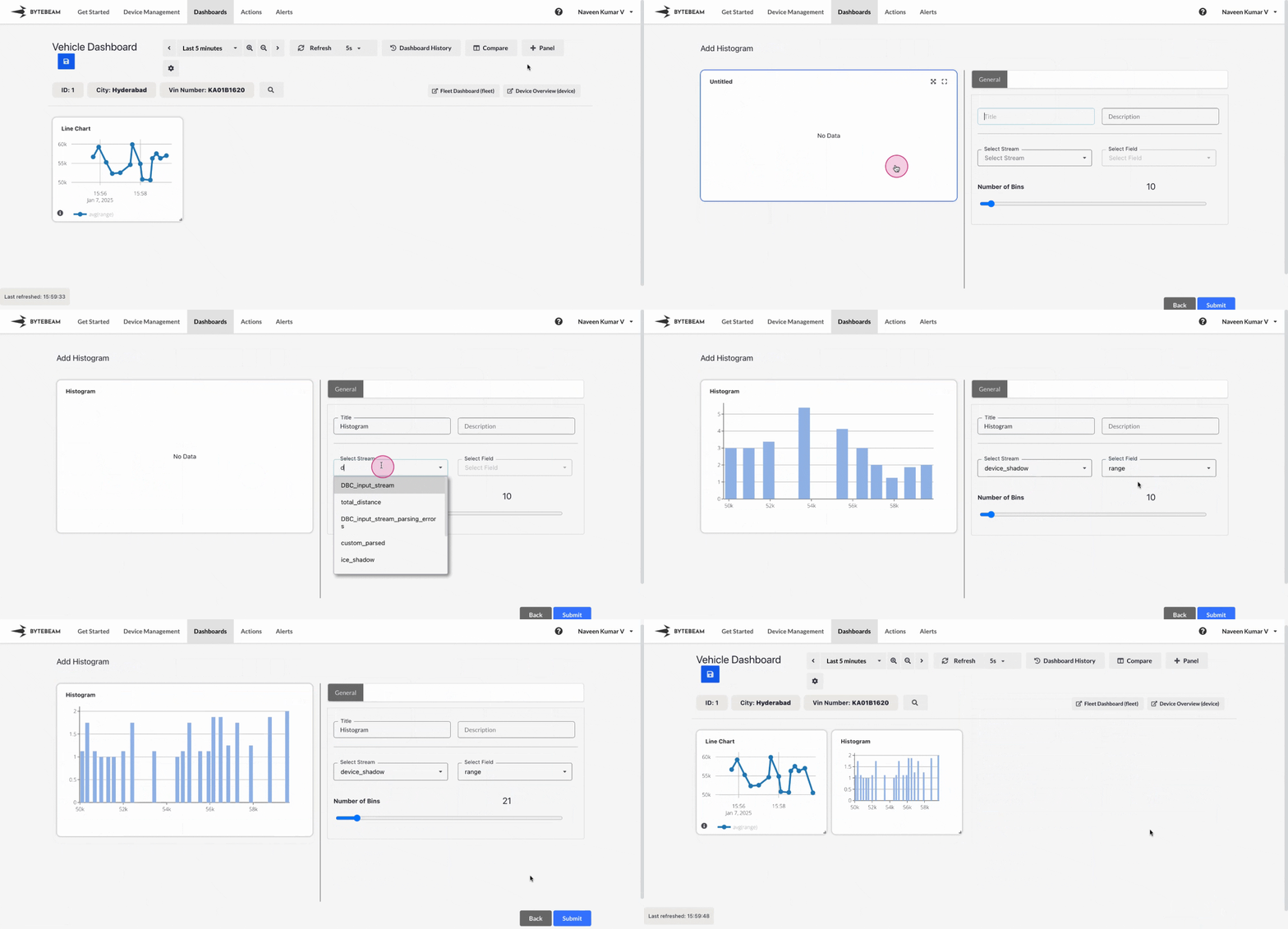
Add Histogram Panel
1
Navigate to Dashboards
Go to the Dashboards tab, select the desired dashboard, and click on the + Panel button to create a new panel.
2
Select Histogram Panel
Choose Histogram Panel from the list of available panels.
3
Configure General Settings
In the General tab:
- Title: Add a title for the panel (optional).
- Stream: Select the data stream to use.
- Field: Choose the column whose data will be used to create the histogram.
- Number of Bins: Adjust the slider to set the number of bins (brackets) for classifying the data.
4
Submit the Panel
Once all configurations are complete, click Submit to add the Histogram Panel to the dashboard.
The histogram will now display the data distribution in bar chart format, allowing for easy visualization and analysis of the data.
The histogram will now display the data distribution in bar chart format, allowing for easy visualization and analysis of the data.