Learn how to effectively monitor device parameters like disk usage, system stats, and network usage with Bytebeam cloud. Follow step-by-step instructions on creating dashboards and adding panels. Find detailed information on the streams associated with each parameter.
This guide will show you how to remotely monitor your device using Bytebeam Cloud. Uplink, by default, collects several parameters of the device, such as disk usage, system stats, and network usage. Each of these parameters is stored in different streams. Please refer to the pages below to see the parameters being collected in each stream.
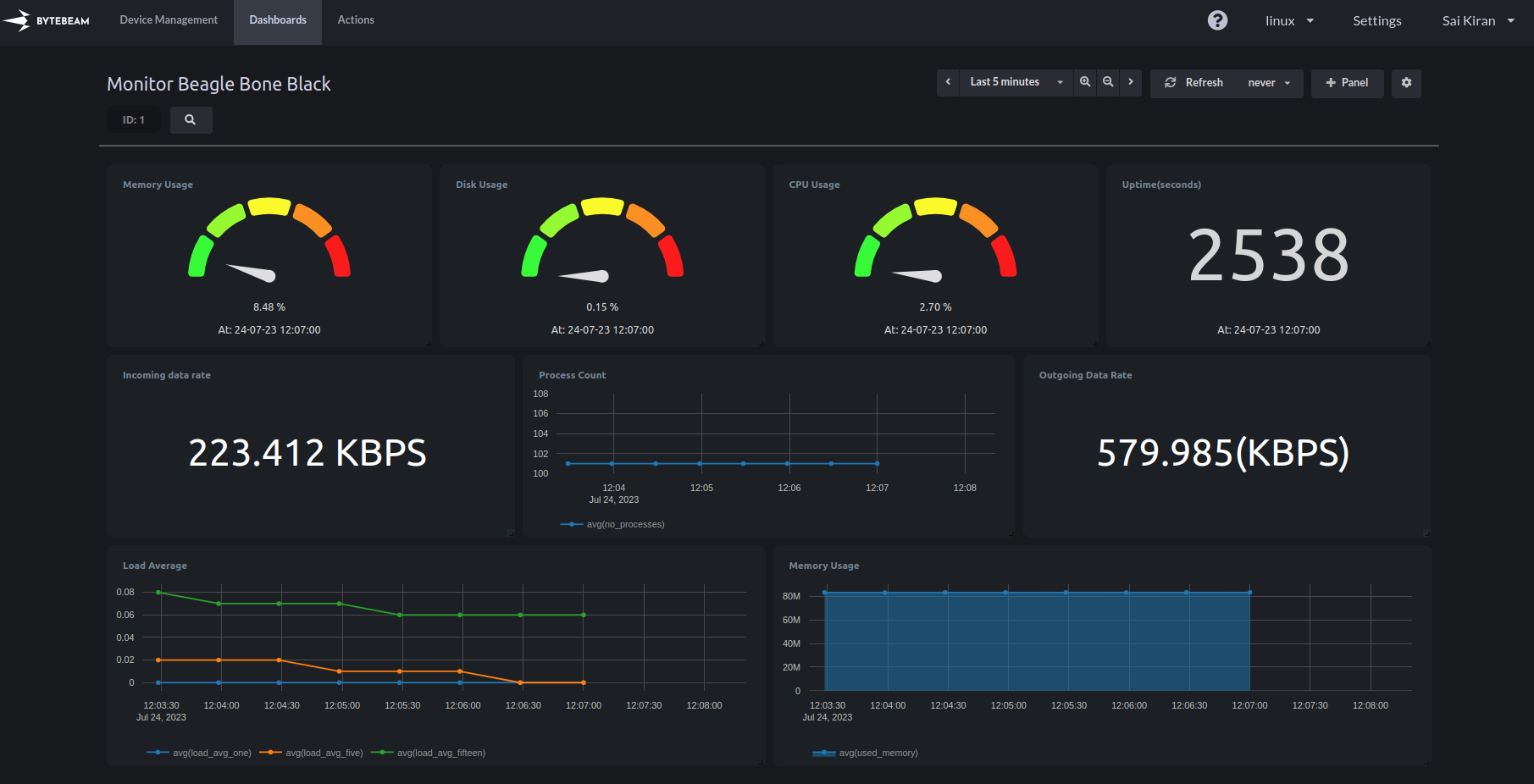
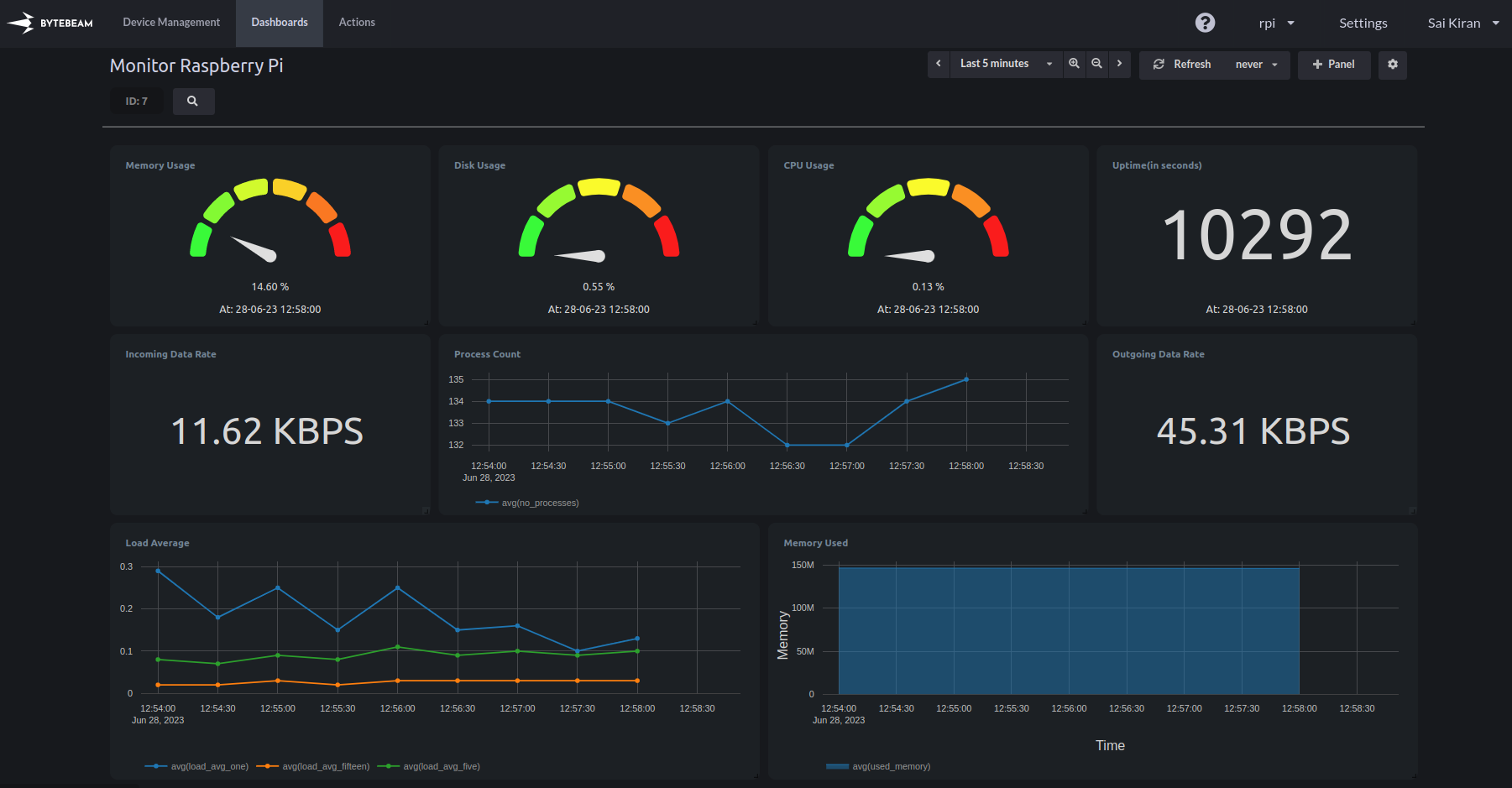
You can create dashboards containing the required parameters. Follow the guides on Creating a Dashboard and Adding a Panel to Dashboard to learn how to work with dashboards.Here is an example dashboard created for a few Linux devices, using the stats.Raspberry Pi:BeagleBoneBlack:
{"docsConfig":{"theme":"mint","$schema":"https://mintlify.com/docs.json","name":"Bytebeam Docs","colors":{"primary":"#3573FF","light":"#3573FF","dark":"#3573FF"},"logo":{"light":"https://mintcdn.com/bytebeamio/WfNer47CK6ltJlI6/logo/light.svg?fit=max\u0026auto=format\u0026n=WfNer47CK6ltJlI6\u0026q=85\u0026s=f41016c84deff3a16c7cb944cf3fec9f","dark":"https://mintcdn.com/bytebeamio/WfNer47CK6ltJlI6/logo/dark.svg?fit=max\u0026auto=format\u0026n=WfNer47CK6ltJlI6\u0026q=85\u0026s=079cf44736ca5cd2c04fadb006ef87b9"},"favicon":"/favicon.svg","navbar":{"links":[{"href":"mailto:support@bytebeam.io","label":"Support"}],"primary":{"type":"button","label":"Get Access","href":"https://cal.com/kraviteja/bytebeam-101"}},"footer":{"socials":{"github":"https://github.com/bytebeamio","linkedin":"https://www.linkedin.com/company/bytebeam"}},"styling":{"latex":false},"navigation":{"global":{"anchors":[{"anchor":"Bytebeam","icon":"book-open-cover","href":"https://bytebeam.io"},{"anchor":"Community","icon":"discord","href":"https://discord.com/channels/1306597396544884736/1306597837777277000"},{"anchor":"Blog","icon":"newspaper","href":"https://bytebeam.io/blog/"}]},"pages":[]}},"deployment":{"deploymentMetadataValue":{"subdomain":"bytebeamio","hasAudioNarration":false,"actualSubdomain":"bytebeamio","customDomains":["bytebeam.io"],"gitSource":{"type":"github","owner":"bytebeamio","repo":"bytebeam-docs","deployBranch":"main","contentDirectory":"","isPrivate":true,"mountPath":"","label":""},"chroma":{"liveDeploymentHistoryId":"6a21e64f94a5dc2e6daf395d","collectionId":"4327b2aa-746d-44e6-8282-cd3273e0b9cc","schemaVersion":"v2"},"entitlements":{"AI_CHAT":{"status":"DISABLED"}},"buildId":"6a21e64f94a5dc2e6daf395d:success","clientVersion":"0.0.4044","searchFilterCounts":[{"language":"default","tag":"API Reference","count":247},{"language":"default","tag":"Platform Guide","count":246},{"language":"default","tag":"Release Notes","count":72},{"language":"default","tag":"devices","count":48},{"language":"default","tag":"Settings","count":43},{"language":"default","tag":"Actions","count":32},{"language":"default","tag":"admin","count":31},{"language":"default","tag":"Dashboards","count":29},{"language":"default","tag":"Inventory management","count":22},{"language":"default","tag":"Linux Integration","count":21}]},"assistantConfig":{},"basePath":"/docs","hasChatPermissions":false,"hasWebMcpPermissions":false,"toggles":[],"googleFontsInlined":false},"customCss":[],"page":{"pagePath":"device-side-integrations/linux/monitoring-your-device/overview","slug":"/device-side-integrations/linux/monitoring-your-device/overview","pageMetadata":{"title":"Monitoring your device","slug":"prsWVWcRBsbfUOWW-bNkZ","description":"Learn how to effectively monitor device parameters like disk usage, system stats, and network usage with Bytebeam cloud. Follow step-by-step instructions on creating dashboards and adding panels. Find detailed information on the streams associated with each parameter.","createdAt":"2023-06-15T14:19:14.000Z","updatedAt":"2023-11-08T06:20:34.604Z","href":"/device-side-integrations/linux/monitoring-your-device/overview","hidden":false},"description":{"compiledSource":"\"use strict\";\nconst {jsx: _jsx} = arguments[0];\nconst {useMDXComponents: _provideComponents} = arguments[0];\nfunction _createMdxContent(props) {\n const _components = {\n p: \"p\",\n ..._provideComponents(),\n ...props.components\n };\n return _jsx(_components.p, {\n children: \"Learn how to effectively monitor device parameters like disk usage, system stats, and network usage with Bytebeam cloud. Follow step-by-step instructions on creating dashboards and adding panels. Find detailed information on the streams associated with each parameter.\"\n });\n}\nfunction MDXContent(props = {}) {\n const {wrapper: MDXLayout} = {\n ..._provideComponents(),\n ...props.components\n };\n return MDXLayout ? _jsx(MDXLayout, {\n ...props,\n children: _jsx(_createMdxContent, {\n ...props\n })\n }) : _createMdxContent(props);\n}\nreturn {\n default: MDXContent\n};\n","frontmatter":{},"scope":{}},"pageType":"default","mdx":{"mdxSource":{"compiledSource":"\"use strict\";const{Fragment:_Fragment,jsx:_jsx,jsxs:_jsxs}=arguments[0];const{useMDXComponents:_provideComponents}=arguments[0];function _createMdxContent(props){const _components={a:`a`,img:`img`,li:`li`,p:`p`,strong:`strong`,ul:`ul`,..._provideComponents(),...props.components};return _jsxs(_Fragment,{children:[_jsx(_components.p,{children:`This guide will show you how to remotely monitor your device using Bytebeam Cloud. Uplink, by default, collects several parameters of the device, such as disk usage, system stats, and network usage. Each of these parameters is stored in different streams. Please refer to the pages below to see the parameters being collected in each stream.`}),`\n`,_jsxs(_components.ul,{children:[`\n`,_jsx(_components.li,{children:_jsx(_components.a,{href:`https://bytebeamio.mintlify.app/device-side-integrations/linux/monitoring-your-device/system-stats`,children:`System Stats`})}),`\n`,_jsx(_components.li,{children:_jsx(_components.a,{href:`https://bytebeamio.mintlify.app/device-side-integrations/linux/monitoring-your-device/network-stats`,children:`Network Stats`})}),`\n`,_jsx(_components.li,{children:_jsx(_components.a,{href:`https://bytebeamio.mintlify.app/device-side-integrations/linux/monitoring-your-device/process-stats`,children:`Process Stats`})}),`\n`,_jsx(_components.li,{children:_jsx(_components.a,{href:`https://bytebeamio.mintlify.app/device-side-integrations/linux/monitoring-your-device/disk-stats`,children:`Disk Stats`})}),`\n`,_jsxs(_components.li,{children:[_jsx(_components.a,{href:`https://bytebeamio.mintlify.app/device-side-integrations/linux/monitoring-your-device/processor-stats`,children:`Processor Stats`}),` `]}),`\n`]}),`\n`,_jsxs(_components.p,{children:[`You can create dashboards containing the required parameters. Follow the guides on `,_jsx(_components.a,{href:`https://bytebeamio.mintlify.app/platform-guide/dashboards/creating-a-dashboard`,children:`Creating a Dashboard`}),` and `,_jsx(_components.a,{href:`https://bytebeamio.mintlify.app/platform-guide/dashboards/panels/introduction-to-panels`,children:`Adding a Panel to Dashboard`}),` to learn how to work with dashboards.`]}),`\n`,_jsx(_components.p,{children:`Here is an example dashboard created for a few Linux devices, using the stats.`}),`\n`,_jsx(_components.p,{children:_jsx(_components.strong,{children:`Raspberry Pi:`})}),`\n`,_jsx(_components.p,{children:_jsx(_components.img,{src:`https://archbee-image-uploads.s3.amazonaws.com/KgoQSkw-NkQJykt01OVJo/P5QJ-eZohb6JmIr0vjO9P_rpistats.png`,alt:``})}),`\n`,_jsx(_components.p,{children:_jsx(_components.strong,{children:`BeagleBoneBlack:`})}),`\n`,_jsx(_components.p,{children:_jsx(_components.img,{src:`https://archbee-image-uploads.s3.amazonaws.com/KgoQSkw-NkQJykt01OVJo/LE3r1chW2snZOjAbvlRQs_monitorbbb.png`,alt:``})})]})}function MDXContent(props={}){const{wrapper:MDXLayout}={..._provideComponents(),...props.components};return MDXLayout?_jsx(MDXLayout,{...props,children:_jsx(_createMdxContent,{...props})}):_createMdxContent(props)}return{default:MDXContent}","frontmatter":{},"scope":{"config":{},"pageMetadata":{"title":"Monitoring your device","slug":"prsWVWcRBsbfUOWW-bNkZ","description":"Learn how to effectively monitor device parameters like disk usage, system stats, and network usage with Bytebeam cloud. Follow step-by-step instructions on creating dashboards and adding panels. Find detailed information on the streams associated with each parameter.","createdAt":"2023-06-15T14:19:14.000Z","updatedAt":"2023-11-08T06:20:34.604Z","href":"/device-side-integrations/linux/monitoring-your-device/overview","hidden":false}}},"mdxSourceWithNoJs":null},"mdxExtracts":{"tableOfContents":[],"codeExamples":{}},"jsLinks":[],"subdomain":"bytebeamio","siteName":"Bytebeam Docs","title":"Monitoring your device - Bytebeam Docs","navMaps":{"firstHrefInVersion":{},"firstHrefInLanguage":{}},"lastModified":"2026-03-03T13:15:18.088Z","originalFileLocation":"device-side-integrations/linux/monitoring-your-device/overview.mdx"},"headHtml":"\u003cscript data-mint-head>(function(){var d=document.documentElement,p=null;if(!p){try{p=localStorage.getItem(\"isDarkMode\")}catch(e){}if(p==='true')p='dark';else if(p==='false')p='light';if(p!=='light'\u0026\u0026p!=='dark'\u0026\u0026p!=='system')p=\"system\"}var r=p==='system'?(matchMedia(\"(prefers-color-scheme: dark)\").matches?'dark':'light'):p;d.classList.remove(r==='dark'?'light':'dark');d.classList.add(r);d.setAttribute(\"data-theme-preference\",p)})();\u003c/script>\u003cmeta data-mint-head name=\"description\" content=\"Learn how to effectively monitor device parameters like disk usage, system stats, and network usage with Bytebeam cloud. Follow step-by-step instructions on creating dashboards and adding panels. Find detailed information on the streams associated with each parameter.\">\u003cmeta data-mint-head name=\"application-name\" content=\"Bytebeam Docs\">\u003cmeta data-mint-head name=\"generator\" content=\"Mintlify\">\u003clink data-mint-head rel=\"icon\" type=\"image/png\" sizes=\"192x192\" href=\"/docs/mintlify-assets/_mintlify/favicons/bytebeamio/Et4_obTvFXed0p5n/_generated/favicon/android-chrome-192x192.png\" media=\"(prefers-color-scheme: light)\">\u003clink data-mint-head rel=\"apple-touch-icon\" type=\"image/png\" sizes=\"180x180\" href=\"/docs/mintlify-assets/_mintlify/favicons/bytebeamio/Et4_obTvFXed0p5n/_generated/favicon/apple-touch-icon.png\">\u003clink data-mint-head rel=\"icon\" type=\"image/png\" sizes=\"16x16\" href=\"/docs/mintlify-assets/_mintlify/favicons/bytebeamio/Et4_obTvFXed0p5n/_generated/favicon/favicon-16x16.png\" media=\"(prefers-color-scheme: light)\">\u003clink data-mint-head rel=\"icon\" type=\"image/png\" sizes=\"32x32\" href=\"/docs/mintlify-assets/_mintlify/favicons/bytebeamio/Et4_obTvFXed0p5n/_generated/favicon/favicon-32x32.png\" media=\"(prefers-color-scheme: light)\">\u003clink data-mint-head rel=\"shortcut icon\" type=\"image/x-icon\" href=\"/docs/mintlify-assets/_mintlify/favicons/bytebeamio/Et4_obTvFXed0p5n/_generated/favicon/favicon.ico\" media=\"(prefers-color-scheme: light)\">\u003clink data-mint-head rel=\"icon\" type=\"image/png\" sizes=\"192x192\" href=\"/docs/mintlify-assets/_mintlify/favicons/bytebeamio/Et4_obTvFXed0p5n/_generated/favicon-dark/android-chrome-192x192.png\" media=\"(prefers-color-scheme: dark)\">\u003clink data-mint-head rel=\"icon\" type=\"image/png\" sizes=\"16x16\" href=\"/docs/mintlify-assets/_mintlify/favicons/bytebeamio/Et4_obTvFXed0p5n/_generated/favicon-dark/favicon-16x16.png\" media=\"(prefers-color-scheme: dark)\">\u003clink data-mint-head rel=\"icon\" type=\"image/png\" sizes=\"32x32\" href=\"/docs/mintlify-assets/_mintlify/favicons/bytebeamio/Et4_obTvFXed0p5n/_generated/favicon-dark/favicon-32x32.png\" media=\"(prefers-color-scheme: dark)\">\u003clink data-mint-head rel=\"shortcut icon\" type=\"image/x-icon\" href=\"/docs/mintlify-assets/_mintlify/favicons/bytebeamio/Et4_obTvFXed0p5n/_generated/favicon-dark/favicon.ico\" media=\"(prefers-color-scheme: dark)\">\u003cmeta data-mint-head property=\"og:title\" content=\"Monitoring your device - Bytebeam Docs\">\u003cmeta data-mint-head property=\"og:description\" content=\"Learn how to effectively monitor device parameters like disk usage, system stats, and network usage with Bytebeam cloud. Follow step-by-step instructions on creating dashboards and adding panels. Find detailed information on the streams associated with each parameter.\">\u003cmeta data-mint-head property=\"og:site_name\" content=\"Bytebeam Docs\">\u003cmeta data-mint-head property=\"og:url\" content=\"https://bytebeam.io/docs/device-side-integrations/linux/monitoring-your-device/overview\">\u003cmeta data-mint-head property=\"og:type\" content=\"website\">\u003cmeta data-mint-head property=\"og:image\" content=\"https://bytebeamio.mintlify.app/_mintlify/api/og/v2?division=Monitoring+your+device\u0026amp;title=Monitoring+your+device\u0026amp;description=Learn+how+to+effectively+monitor+device+parameters+like+disk+usage%2C+system+stats%2C+and+network+usage+with+Bytebeam+cloud.+Follow+step-by-step+instructions+on+cre\u0026amp;theme=88c16858a93f3aaa20738c7a\u0026amp;signature=daea7f37bc3bcca8fbd01cb05e5c25620093de320452300032b357383e335946\">\u003cmeta data-mint-head property=\"og:image:width\" content=\"1200\">\u003cmeta data-mint-head property=\"og:image:height\" content=\"630\">\u003cmeta data-mint-head name=\"twitter:card\" content=\"summary_large_image\">\u003cmeta data-mint-head name=\"twitter:title\" content=\"Monitoring your device - Bytebeam Docs\">\u003cmeta data-mint-head name=\"twitter:description\" content=\"Learn how to effectively monitor device parameters like disk usage, system stats, and network usage with Bytebeam cloud. Follow step-by-step instructions on creating dashboards and adding panels. Find detailed information on the streams associated with each parameter.\">\u003cmeta data-mint-head name=\"twitter:image\" content=\"https://bytebeamio.mintlify.app/_mintlify/api/og/v2?division=Monitoring+your+device\u0026amp;title=Monitoring+your+device\u0026amp;description=Learn+how+to+effectively+monitor+device+parameters+like+disk+usage%2C+system+stats%2C+and+network+usage+with+Bytebeam+cloud.+Follow+step-by-step+instructions+on+cre\u0026amp;theme=88c16858a93f3aaa20738c7a\u0026amp;signature=daea7f37bc3bcca8fbd01cb05e5c25620093de320452300032b357383e335946\">\u003cmeta data-mint-head name=\"twitter:image:width\" content=\"1200\">\u003cmeta data-mint-head name=\"twitter:image:height\" content=\"630\">\u003cmeta data-mint-head name=\"msapplication-config\" content=\"/docs/mintlify-assets/_mintlify/favicons/bytebeamio/Et4_obTvFXed0p5n/_generated/favicon/browserconfig.xml\">\u003cmeta data-mint-head name=\"apple-mobile-web-app-title\" content=\"Bytebeam Docs\">\u003cmeta data-mint-head name=\"msapplication-TileColor\" content=\"#3573FF\">\u003clink data-mint-head rel=\"canonical\" href=\"https://bytebeam.io/docs/device-side-integrations/linux/monitoring-your-device/overview\">\u003clink data-mint-head rel=\"alternate\" type=\"application/xml\" href=\"/docs/sitemap.xml\">\u003clink data-mint-head rel=\"alternate\" type=\"text/markdown\" href=\"/docs/device-side-integrations/linux/monitoring-your-device/overview.md\">\u003cscript data-mint-head type=\"application/ld+json\">{\"@context\":\"https://schema.org\",\"@graph\":[{\"@type\":\"Organization\",\"@id\":\"https://bytebeam.io/#organization\",\"name\":\"Bytebeam Docs\",\"url\":\"https://bytebeam.io\",\"logo\":{\"@type\":\"ImageObject\",\"url\":\"https://mintcdn.com/bytebeamio/WfNer47CK6ltJlI6/logo/light.svg?fit=max\u0026auto=format\u0026n=WfNer47CK6ltJlI6\u0026q=85\u0026s=f41016c84deff3a16c7cb944cf3fec9f\"}},{\"@type\":\"WebSite\",\"@id\":\"https://bytebeam.io/docs#website\",\"name\":\"Bytebeam Docs\",\"url\":\"https://bytebeam.io/docs\",\"publisher\":{\"@id\":\"https://bytebeam.io/#organization\"}},{\"@type\":\"WebPage\",\"@id\":\"https://bytebeam.io/docs/device-side-integrations/linux/monitoring-your-device/overview#webpage\",\"url\":\"https://bytebeam.io/docs/device-side-integrations/linux/monitoring-your-device/overview\",\"name\":\"Monitoring your device\",\"description\":\"Learn how to effectively monitor device parameters like disk usage, system stats, and network usage with Bytebeam cloud. Follow step-by-step instructions on creating dashboards and adding panels. Find detailed information on the streams associated with each parameter.\",\"dateModified\":\"2026-03-03T13:15:18.088Z\",\"isPartOf\":{\"@id\":\"https://bytebeam.io/docs#website\"},\"breadcrumb\":{\"@id\":\"https://bytebeam.io/docs/device-side-integrations/linux/monitoring-your-device/overview#breadcrumb\"}},{\"@type\":\"BreadcrumbList\",\"@id\":\"https://bytebeam.io/docs/device-side-integrations/linux/monitoring-your-device/overview#breadcrumb\",\"itemListElement\":[{\"@type\":\"ListItem\",\"position\":1,\"name\":\"Linux\",\"item\":\"https://bytebeam.io/docs/device-side-integrations/linux/device-setup/raspberry-pi\"},{\"@type\":\"ListItem\",\"position\":2,\"name\":\"Monitoring your device\",\"item\":\"https://bytebeam.io/docs/device-side-integrations/linux/monitoring-your-device/overview\"}]},{\"@type\":[\"Article\",\"TechArticle\"],\"@id\":\"https://bytebeam.io/docs/device-side-integrations/linux/monitoring-your-device/overview#article\",\"headline\":\"Monitoring your device\",\"name\":\"Monitoring your device\",\"description\":\"Learn how to effectively monitor device parameters like disk usage, system stats, and network usage with Bytebeam cloud. Follow step-by-step instructions on creating dashboards and adding panels. Find detailed information on the streams associated with each parameter.\",\"url\":\"https://bytebeam.io/docs/device-side-integrations/linux/monitoring-your-device/overview\",\"mainEntityOfPage\":{\"@id\":\"https://bytebeam.io/docs/device-side-integrations/linux/monitoring-your-device/overview#webpage\"},\"dateModified\":\"2026-03-03T13:15:18.088Z\",\"publisher\":{\"@id\":\"https://bytebeam.io/#organization\"},\"isPartOf\":{\"@id\":\"https://bytebeam.io/docs#website\"}}]}\u003c/script>\u003cscript data-mint-head type=\"application/ld+json\">{\"@context\":\"https://schema.org\",\"@type\":\"WebSite\",\"name\":\"Bytebeam Docs\",\"creator\":{\"@type\":\"Organization\",\"name\":\"Mintlify\",\"url\":\"https://mintlify.com\"}}\u003c/script>","siteName":"Bytebeam Docs","nav":{"global":{"anchors":[{"anchor":"Bytebeam","icon":"book-open-cover","href":"https://bytebeam.io"},{"anchor":"Community","icon":"discord","href":"https://discord.com/channels/1306597396544884736/1306597837777277000"},{"anchor":"Blog","icon":"newspaper","href":"https://bytebeam.io/blog/"}]},"tabs":[{"tab":"Getting Started","pages":[{"title":"Getting Started","href":"/getting-started/signup"}]},{"tab":"Platform Guide","pages":[{"title":"Platform Guide","href":"/platform-guide/introduction"}]},{"tab":"MCU Integration","pages":[{"title":"MCU Integration","href":"/device-side-integrations/mcu/esp32/esp-idf/setting-up-bytebeam-esp-idf-sdk"}]},{"tab":"Linux Integration","groups":[{"group":"Linux","pages":[{"group":"Device Setup","pages":[{"title":"Raspberry Pi","href":"/device-side-integrations/linux/device-setup/raspberry-pi"},{"title":"BeagleBone Black","href":"/device-side-integrations/linux/device-setup/beaglebone-black"},{"title":"Linux Generic","href":"/device-side-integrations/linux/device-setup/linux-generic"}]},{"title":"Connect to Bytebeam cloud","href":"/device-side-integrations/linux/connect-to-bytebeam-cloud"},{"title":"Pushing data to Bytebeam","href":"/device-side-integrations/linux/pushing-data-to-bytebeam"},{"title":"Customising device shadow","href":"/device-side-integrations/linux/customising-device-shadow"},{"title":"Receiving Actions","href":"/device-side-integrations/linux/receiving-actions"},{"title":"Remote login to your Linux device","href":"/device-side-integrations/linux/remote-login-to-your-linux-device"},{"group":"Integrate Over The Air Updates","pages":[{"title":"Integrate Over The Air Updates","href":"/device-side-integrations/linux/integrate-over-the-air-updates/overview"},{"title":"App Update","href":"/device-side-integrations/linux/integrate-over-the-air-updates/app-update"},{"title":"App Update with rollback","href":"/device-side-integrations/linux/integrate-over-the-air-updates/app-update-with-rollback"},{"title":"Deb Update","href":"/device-side-integrations/linux/integrate-over-the-air-updates/deb-update"},{"title":"Rootfs Update","href":"/device-side-integrations/linux/integrate-over-the-air-updates/rootfs-update"}]},{"title":"Integrate Config Updates","href":"/device-side-integrations/linux/integrate-config-updates"},{"title":"Push application logs","description":"Learn how to effectively view journalctl logs on Bytebeam cloud with this comprehensive document. Discover the step-by-step instructions on setting up streams and dashboards, adding logging to devices, and configuring logging from the cloud.","href":"/device-side-integrations/linux/push-application-logs"},{"group":"Monitoring your device","pages":[{"title":"Monitoring your device","href":"/device-side-integrations/linux/monitoring-your-device/overview"},{"title":"System Stats","description":"Learn about the valuable data provided by the \"uplink_system_stats\" stream, such as kernel version, running processes, device uptime, memory usage, and load averages. Enhance your understanding of system performance to optimize operations and improve efficiency.","href":"/device-side-integrations/linux/monitoring-your-device/system-stats"},{"title":"Network Stats","href":"/device-side-integrations/linux/monitoring-your-device/network-stats"},{"title":"Process Stats","href":"/device-side-integrations/linux/monitoring-your-device/process-stats"},{"title":"Disk Stats","href":"/device-side-integrations/linux/monitoring-your-device/disk-stats"},{"title":"Processor Stats","href":"/device-side-integrations/linux/monitoring-your-device/processor-stats"}]}]}]},{"tab":"Android Integration","pages":[{"title":"Android Integration","href":"/device-side-integrations/android/device-setup"}]},{"tab":"Custom Integration","pages":[{"title":"Custom Integration","href":"/device-side-integrations/custom/connecting-to-bytebeam-cloud"}]},{"tab":"API Reference","pages":[{"title":"API Reference","href":"/api-reference/devices/get-the-list-of-devices--paginated"}]},{"tab":"Release Notes","pages":[{"title":"Release Notes","href":"/release-notes/r36-03-dec-2025"}]}]},"basePath":"","title":"Monitoring your device - Bytebeam Docs","buildId":"dpl_6cCEiK8XNNvaLBBkWzcBhdE9QfLC","deploymentId":"dpl_6cCEiK8XNNvaLBBkWzcBhdE9QfLC","dynamics":["a74be98ba7"],"chunks":["zoom-image-lightbox-B-WKhCOL.js","lightbox-handle-r17bVUz3.js"]}