

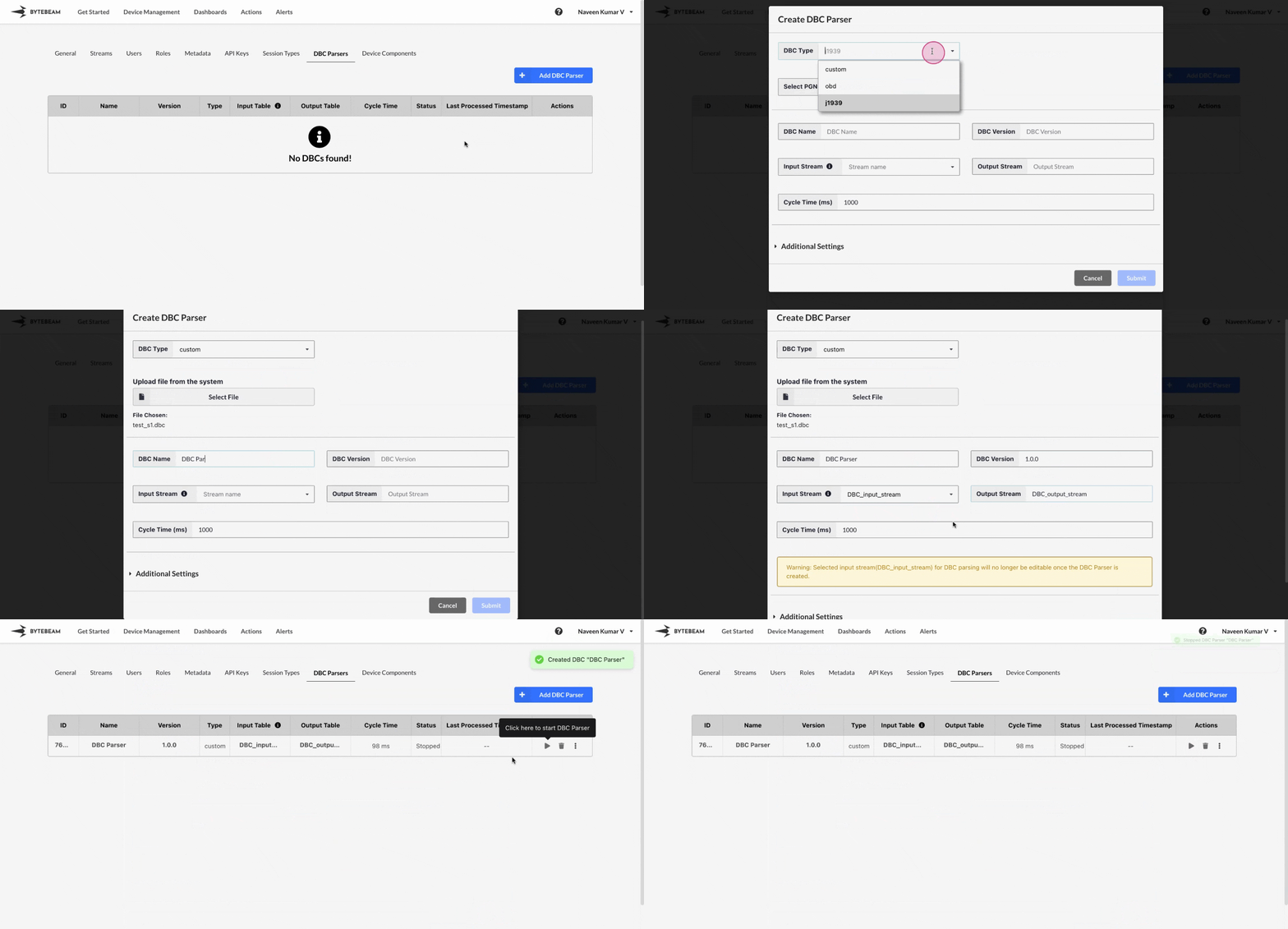
 To create a new dbc parser in Bytebeam console,
1
Access Settings Tab
Navigate to the Settings Tab by clicking on your username at the top right
2
Go to DBC Parsers Tab and Initiate DBC Parser Creation
Navigate to the DBC Parsers tab and click on the + Add DBC Parser button
3
Fill Details
Select the DBC Type and fill all the other details such as DBC Name, DBC Version, Input Stream, Output Stream, Cycle time and Advanced settings(Optional) and click on Submit button to create the parser.
DBC types
There are 3 DBC types available.custom
custom
You can upload the custom DBC file to create the parser instead of relying on standard DBCs.
j1939
j1939
You can choose this and select the PGNs(Parameter Group Numbers) from the dropdown to create the parser.
obd
obd
You can choose this and enter the CAN ID to create the parser.
Important Info
Use the icons next to each created dbc parser to start or stop the parser.
Hover over the DBC name to view its ID and name in the tooltip. Click on the name to copy both to the clipboard.