

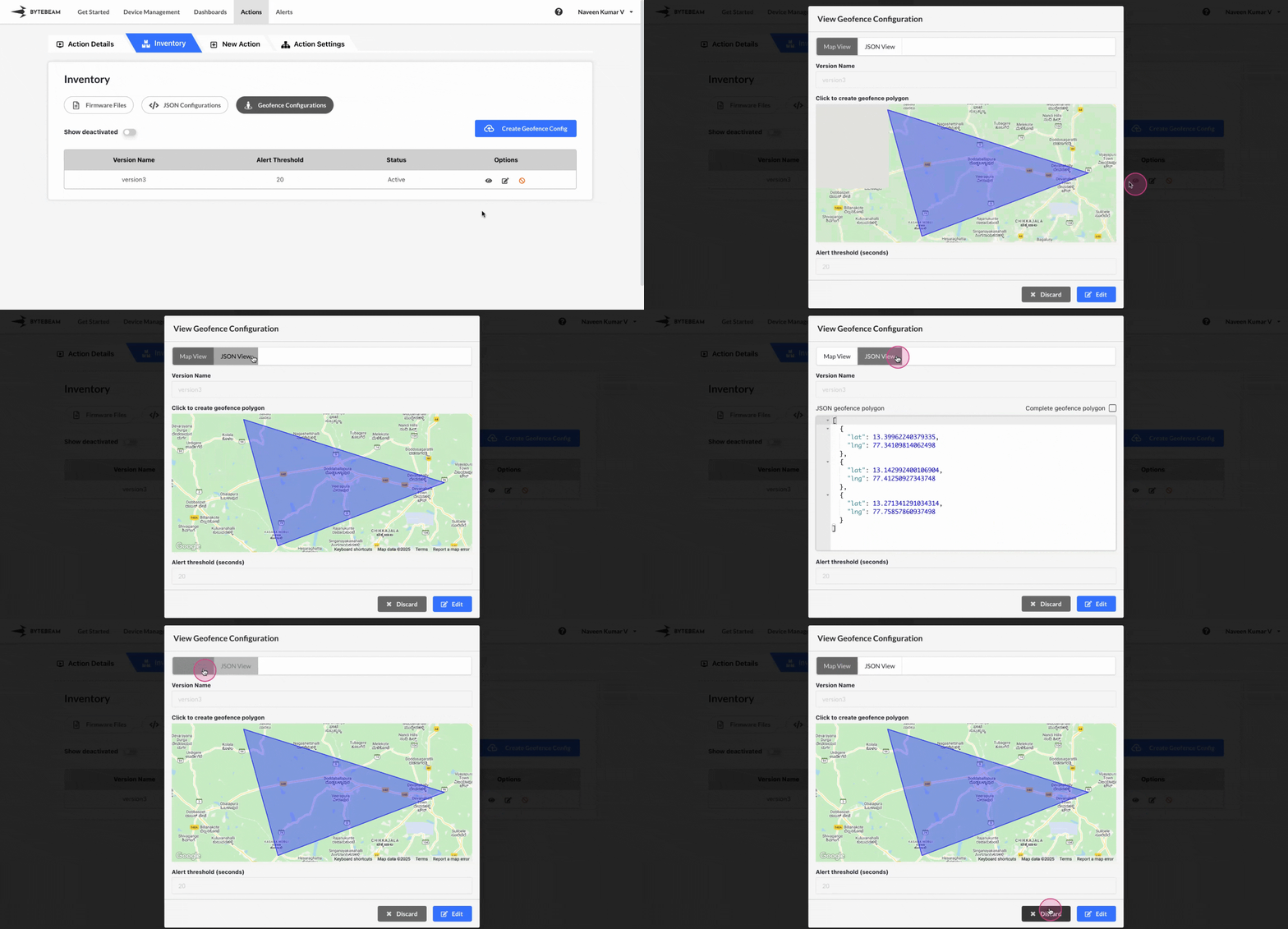
 To view a Geofence Configuration version in Bytebeam console,
1
Access Actions Tab
Click on the Actions tab
2
Go to Inventory Tab and Access Geofence Configurations Tab
Navigate to the Geofence Configurations tab by clicking on Inventory section
3
Locate the desired Geofence Configuration version
Click on Geofence Configurations tab and locate the desired Geofence Configuration version
4
Click on Eye icon
Click on Eye icon against the located version to view it.
You can edit the Geofence Configuration version by clicking on Edit button and follow the instructions
1
Access Actions Tab
Click on the Actions tab
2
Go to Inventory Tab and Access Geofence Configurations Tab
Navigate to the Geofence Configurations tab by clicking on Inventory section
3
Enable 'Show Deactivated' toggle
Click on Geofence Configurations tab and click on Show Deactivated toggle.
4
Locate the desired Geofence Configuration version
Scroll to the desired Geofence Configuration version
5
Click on Eye icon
Click on Eye icon against the located deactivated version to view it.