Learn how to add device parameters to your device shadow stream with these step-by-step instructions. Navigate to the Admin tab, and easily add highlighted device parameters to ensure they are visible in the device shadow. Enhance your device monitoring abilities.
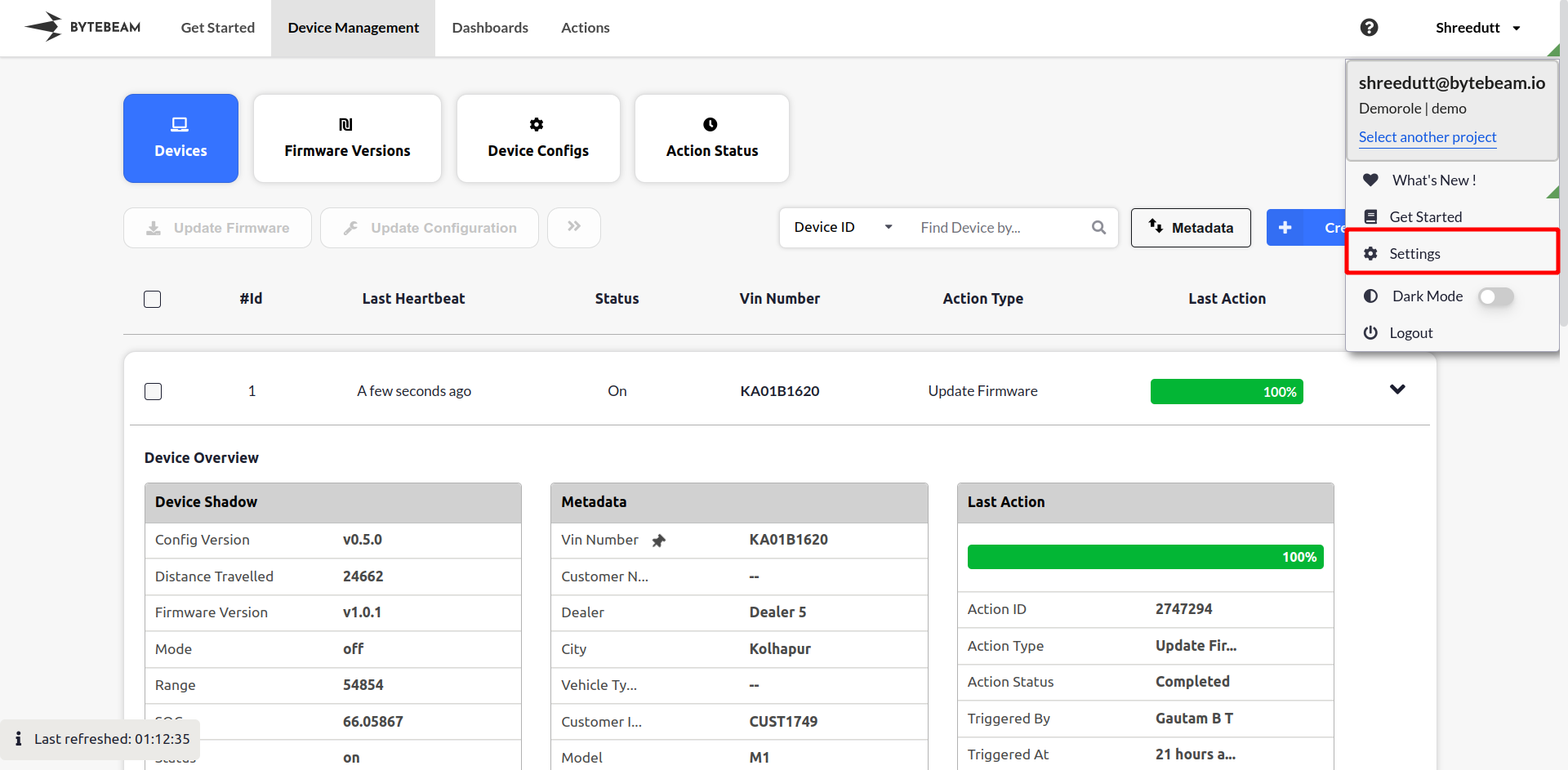
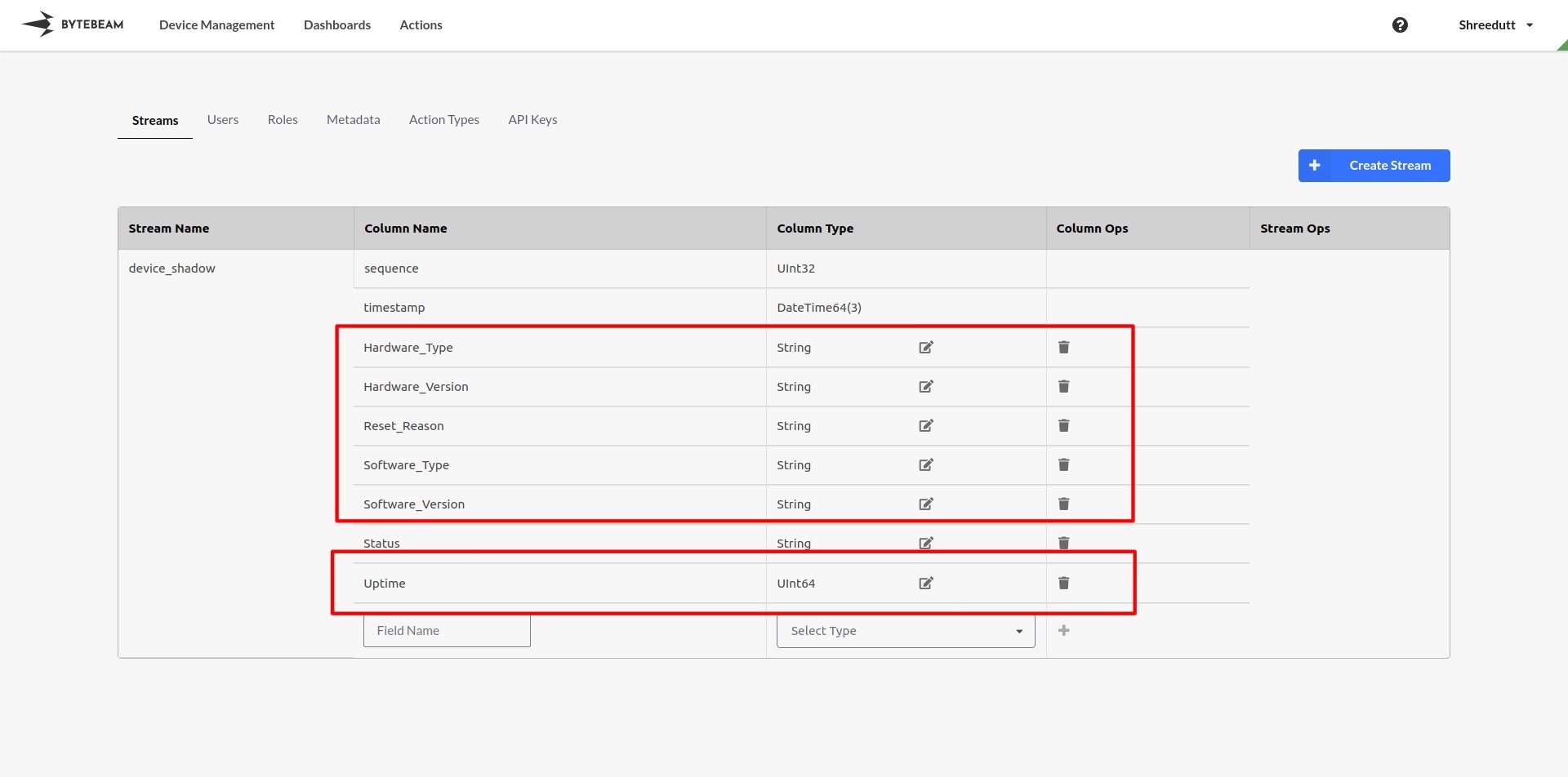
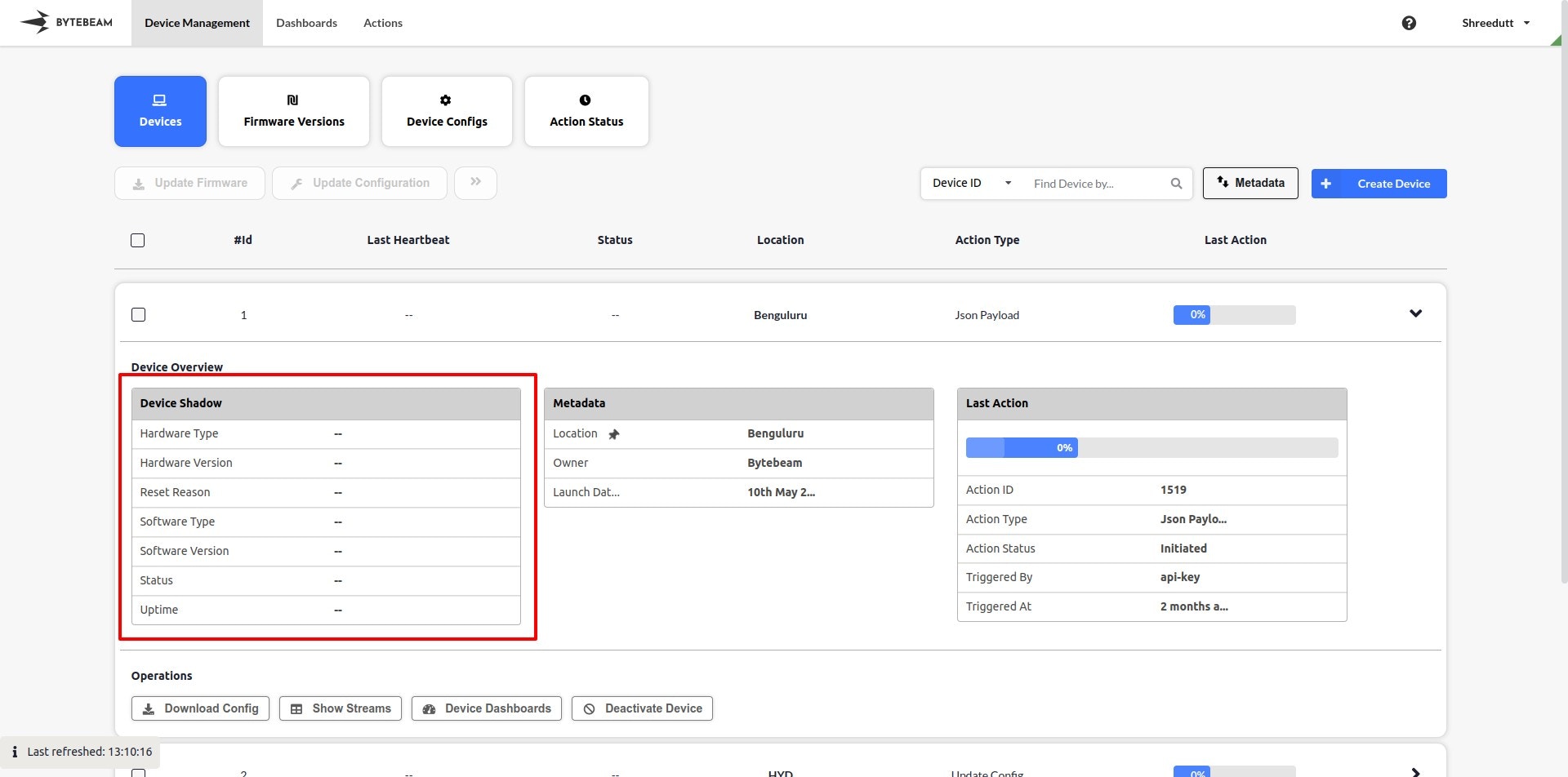
To add device parametersStep 1: Navigate to the Settings Tab by clicking on the user name at the top rightStep 2: Add the highlighted device parameters in the device shadow stream.Step 3: You should see the device parameters in the device shadow.
{"docsConfig":{"theme":"mint","$schema":"https://mintlify.com/docs.json","name":"Bytebeam Docs","colors":{"primary":"#3573FF","light":"#3573FF","dark":"#3573FF"},"logo":{"light":"https://mintcdn.com/bytebeamio/WfNer47CK6ltJlI6/logo/light.svg?fit=max\u0026auto=format\u0026n=WfNer47CK6ltJlI6\u0026q=85\u0026s=f41016c84deff3a16c7cb944cf3fec9f","dark":"https://mintcdn.com/bytebeamio/WfNer47CK6ltJlI6/logo/dark.svg?fit=max\u0026auto=format\u0026n=WfNer47CK6ltJlI6\u0026q=85\u0026s=079cf44736ca5cd2c04fadb006ef87b9"},"favicon":"/favicon.svg","navbar":{"links":[{"href":"mailto:support@bytebeam.io","label":"Support"}],"primary":{"type":"button","label":"Get Access","href":"https://cal.com/kraviteja/bytebeam-101"}},"footer":{"socials":{"github":"https://github.com/bytebeamio","linkedin":"https://www.linkedin.com/company/bytebeam"}},"styling":{"latex":false},"navigation":{"global":{"anchors":[{"anchor":"Bytebeam","icon":"book-open-cover","href":"https://bytebeam.io"},{"anchor":"Community","icon":"discord","href":"https://discord.com/channels/1306597396544884736/1306597837777277000"},{"anchor":"Blog","icon":"newspaper","href":"https://bytebeam.io/blog/"}]},"pages":[]}},"deployment":{"deploymentMetadataValue":{"subdomain":"bytebeamio","hasAudioNarration":false,"actualSubdomain":"bytebeamio","customDomains":["bytebeam.io"],"gitSource":{"type":"github","owner":"bytebeamio","repo":"bytebeam-docs","deployBranch":"main","contentDirectory":"","isPrivate":true,"mountPath":"","label":""},"chroma":{"liveDeploymentHistoryId":"6a21e64f94a5dc2e6daf395d","collectionId":"4327b2aa-746d-44e6-8282-cd3273e0b9cc","schemaVersion":"v2"},"entitlements":{"AI_CHAT":{"status":"DISABLED"}},"buildId":"6a21e64f94a5dc2e6daf395d:success","clientVersion":"0.0.4044","searchFilterCounts":[{"language":"default","tag":"API Reference","count":247},{"language":"default","tag":"Platform Guide","count":246},{"language":"default","tag":"Release Notes","count":72},{"language":"default","tag":"devices","count":48},{"language":"default","tag":"Settings","count":43},{"language":"default","tag":"Actions","count":32},{"language":"default","tag":"admin","count":31},{"language":"default","tag":"Dashboards","count":29},{"language":"default","tag":"Inventory management","count":22},{"language":"default","tag":"Linux Integration","count":21}]},"assistantConfig":{},"basePath":"/docs","hasChatPermissions":false,"hasWebMcpPermissions":false,"toggles":[{"name":"kill-isr","enabled":true,"variant":{"name":"disabled","enabled":false,"feature_enabled":true},"impressionData":false},{"name":"agent-mintlify-slack","enabled":true,"variant":{"name":"disabled","enabled":false,"feature_enabled":true},"impressionData":false},{"name":"agent-integrations-settings","enabled":true,"variant":{"name":"disabled","enabled":false,"feature_enabled":true},"impressionData":false},{"name":"automations-pr-grouping","enabled":true,"variant":{"name":"disabled","enabled":false,"feature_enabled":true},"impressionData":false},{"name":"custom-prefix","enabled":true,"variant":{"name":"disabled","enabled":false,"feature_enabled":true},"impressionData":false},{"name":"analytics-v7","enabled":true,"variant":{"name":"disabled","enabled":false,"feature_enabled":true},"impressionData":false},{"name":"user-flows-analytics","enabled":true,"variant":{"name":"disabled","enabled":false,"feature_enabled":true},"impressionData":false},{"name":"no-publish-flow","enabled":true,"variant":{"name":"disabled","enabled":false,"feature_enabled":true},"impressionData":false},{"name":"workos-onboarding","enabled":true,"variant":{"name":"disabled","enabled":false,"feature_enabled":true},"impressionData":false},{"name":"llms-txt-v2","enabled":true,"variant":{"name":"disabled","enabled":false,"feature_enabled":true},"impressionData":false},{"name":"snapshot-serving-live","enabled":true,"variant":{"name":"disabled","enabled":false,"feature_enabled":true},"impressionData":false},{"name":"stripTemperatureMiddleware","enabled":true,"variant":{"name":"disabled","enabled":false,"feature_enabled":true},"impressionData":false},{"name":"support-platform-pylon-zendesk","enabled":true,"variant":{"name":"disabled","enabled":false,"feature_enabled":true},"impressionData":false},{"name":"snapshot-serving","enabled":true,"variant":{"name":"disabled","enabled":false,"feature_enabled":true},"impressionData":false},{"name":"instant-rollback","enabled":true,"variant":{"name":"disabled","enabled":false,"feature_enabled":true},"impressionData":false},{"name":"granular-notifications-server","enabled":true,"variant":{"name":"disabled","enabled":false,"feature_enabled":true},"impressionData":false},{"name":"granular-notifications","enabled":true,"variant":{"name":"disabled","enabled":false,"feature_enabled":true},"impressionData":false},{"name":"automations-fable","enabled":true,"variant":{"name":"disabled","enabled":false,"feature_enabled":true},"impressionData":false},{"name":"fixed-ai-action-pricing","enabled":true,"variant":{"name":"disabled","enabled":false,"feature_enabled":true},"impressionData":false},{"name":"automation-resolve-merge-conflict","enabled":true,"variant":{"name":"disabled","enabled":false,"feature_enabled":true},"impressionData":false},{"name":"scoped-publishing","enabled":true,"variant":{"name":"disabled","enabled":false,"feature_enabled":true},"impressionData":false},{"name":"mintql","enabled":true,"variant":{"name":"disabled","enabled":false,"feature_enabled":true},"impressionData":false},{"name":"page-level-analytics","enabled":true,"variant":{"name":"disabled","enabled":false,"feature_enabled":true},"impressionData":false},{"name":"editor-version-history-v2","enabled":true,"variant":{"name":"disabled","enabled":false,"feature_enabled":true},"impressionData":false},{"name":"billing-page-v2","enabled":true,"variant":{"name":"disabled","enabled":false,"feature_enabled":true},"impressionData":false},{"name":"full-page-search","enabled":true,"variant":{"name":"disabled","enabled":false,"feature_enabled":true},"impressionData":false},{"name":"workspace-projects","enabled":true,"variant":{"name":"disabled","enabled":false,"feature_enabled":true},"impressionData":false},{"name":"assistant-v5","enabled":true,"variant":{"name":"disabled","enabled":false,"feature_enabled":true},"impressionData":false},{"name":"byok-sep-25","enabled":true,"variant":{"name":"disabled","enabled":false,"feature_enabled":true},"impressionData":false},{"name":"fork-pr-previews","enabled":true,"variant":{"name":"disabled","enabled":false,"feature_enabled":true},"impressionData":false},{"name":"revalidation-jwt","enabled":true,"variant":{"name":"disabled","enabled":false,"feature_enabled":true},"impressionData":false},{"name":"vite-origin","enabled":true,"variant":{"name":"disabled","enabled":false,"feature_enabled":true},"impressionData":false},{"name":"billing-updated-9-15","enabled":true,"variant":{"name":"disabled","enabled":false,"feature_enabled":true},"impressionData":false},{"name":"workos-sso-scim","enabled":true,"variant":{"name":"disabled","enabled":false,"feature_enabled":true},"impressionData":false},{"name":"hobby-abuse-scan","enabled":true,"variant":{"name":"disabled","enabled":false,"feature_enabled":true},"impressionData":false},{"name":"dashboard-inbox","enabled":true,"variant":{"name":"disabled","enabled":false,"feature_enabled":true},"impressionData":false},{"name":"workos-signup","enabled":true,"variant":{"name":"disabled","enabled":false,"feature_enabled":true},"impressionData":false},{"name":"turbopuffer-dual-write","enabled":true,"variant":{"name":"disabled","enabled":false,"feature_enabled":true},"impressionData":false},{"name":"workos-enabled","enabled":true,"variant":{"name":"disabled","enabled":false,"feature_enabled":true},"impressionData":false},{"name":"approve-review-flow","enabled":true,"variant":{"name":"disabled","enabled":false,"feature_enabled":true},"impressionData":false},{"name":"sso-setup-deadline-banner","enabled":true,"variant":{"name":"disabled","enabled":false,"feature_enabled":true},"impressionData":false}],"googleFontsInlined":false},"customCss":[],"page":{"pagePath":"device-side-integrations/mcu/esp32/esp-idf/add-device-heartbeat-parameters","slug":"/device-side-integrations/mcu/esp32/esp-idf/add-device-heartbeat-parameters","pageMetadata":{"title":"Add Device Heartbeat Parameters","slug":"fGe--device-hear","description":"Learn how to add device parameters to your device shadow stream with these step-by-step instructions. Navigate to the Admin tab, and easily add highlighted device parameters to ensure they are visible in the device shadow. Enhance your device monitoring abilities.","createdAt":"Mon Apr 24 2023 08:29:00 GMT+0000 (Coordinated Universal Time)","updatedAt":"Wed Nov 01 2023 07:53:41 GMT+0000 (Coordinated Universal Time)","href":"/device-side-integrations/mcu/esp32/esp-idf/add-device-heartbeat-parameters","hidden":false},"description":{"compiledSource":"\"use strict\";\nconst {jsx: _jsx} = arguments[0];\nconst {useMDXComponents: _provideComponents} = arguments[0];\nfunction _createMdxContent(props) {\n const _components = {\n p: \"p\",\n ..._provideComponents(),\n ...props.components\n };\n return _jsx(_components.p, {\n children: \"Learn how to add device parameters to your device shadow stream with these step-by-step instructions. Navigate to the Admin tab, and easily add highlighted device parameters to ensure they are visible in the device shadow. Enhance your device monitoring abilities.\"\n });\n}\nfunction MDXContent(props = {}) {\n const {wrapper: MDXLayout} = {\n ..._provideComponents(),\n ...props.components\n };\n return MDXLayout ? _jsx(MDXLayout, {\n ...props,\n children: _jsx(_createMdxContent, {\n ...props\n })\n }) : _createMdxContent(props);\n}\nreturn {\n default: MDXContent\n};\n","frontmatter":{},"scope":{}},"pageType":"default","mdx":{"mdxSource":{"compiledSource":"\"use strict\";const{Fragment:_Fragment,jsx:_jsx,jsxs:_jsxs}=arguments[0];const{useMDXComponents:_provideComponents}=arguments[0];function _createMdxContent(props){const _components={em:`em`,p:`p`,strong:`strong`,..._provideComponents(),...props.components},{OptimizedImage}=_components;if(!OptimizedImage)_missingMdxReference(`OptimizedImage`,true);return _jsxs(_Fragment,{children:[_jsx(_components.p,{children:`To add device parameters`}),`\n`,_jsxs(_components.p,{children:[_jsx(_components.strong,{children:`Step 1:`}),` Navigate to the `,_jsx(_components.em,{children:_jsx(_components.strong,{children:`Settings Tab`})}),` by clicking on the user name at the top right`]}),`\n`,_jsx(OptimizedImage,{src:`https://mintcdn.com/bytebeamio/ZdhGbGJHpHWsN9k0/assets/5OY5oDz-qJzz4AFQfyQZ4_2023-10-2501-13.png?fit=max\u0026auto=format\u0026n=ZdhGbGJHpHWsN9k0\u0026q=85\u0026s=33969e2fa0b518a95d92a2d6e752fa16`,alt:``,\"data-og-width\":`1920`,width:`1920`,\"data-og-height\":`943`,height:`943`,\"data-path\":`assets/5OY5oDz-qJzz4AFQfyQZ4_2023-10-2501-13.png`,\"data-optimize\":`true`,\"data-opv\":`3`,srcset:`https://mintcdn.com/bytebeamio/ZdhGbGJHpHWsN9k0/assets/5OY5oDz-qJzz4AFQfyQZ4_2023-10-2501-13.png?w=280\u0026fit=max\u0026auto=format\u0026n=ZdhGbGJHpHWsN9k0\u0026q=85\u0026s=149cb25f1ea4ffcb92b7e7e2688cb480 280w, https://mintcdn.com/bytebeamio/ZdhGbGJHpHWsN9k0/assets/5OY5oDz-qJzz4AFQfyQZ4_2023-10-2501-13.png?w=560\u0026fit=max\u0026auto=format\u0026n=ZdhGbGJHpHWsN9k0\u0026q=85\u0026s=0de87d0ccfdc18a0c46577ce217755a5 560w, https://mintcdn.com/bytebeamio/ZdhGbGJHpHWsN9k0/assets/5OY5oDz-qJzz4AFQfyQZ4_2023-10-2501-13.png?w=840\u0026fit=max\u0026auto=format\u0026n=ZdhGbGJHpHWsN9k0\u0026q=85\u0026s=d787951fb82d7dce64a13b3e531507a6 840w, https://mintcdn.com/bytebeamio/ZdhGbGJHpHWsN9k0/assets/5OY5oDz-qJzz4AFQfyQZ4_2023-10-2501-13.png?w=1100\u0026fit=max\u0026auto=format\u0026n=ZdhGbGJHpHWsN9k0\u0026q=85\u0026s=b1faa8eaee1f15b078eb17cf3ac51f57 1100w, https://mintcdn.com/bytebeamio/ZdhGbGJHpHWsN9k0/assets/5OY5oDz-qJzz4AFQfyQZ4_2023-10-2501-13.png?w=1650\u0026fit=max\u0026auto=format\u0026n=ZdhGbGJHpHWsN9k0\u0026q=85\u0026s=801529d53455cfba4db4f1bb01c74cfd 1650w, https://mintcdn.com/bytebeamio/ZdhGbGJHpHWsN9k0/assets/5OY5oDz-qJzz4AFQfyQZ4_2023-10-2501-13.png?w=2500\u0026fit=max\u0026auto=format\u0026n=ZdhGbGJHpHWsN9k0\u0026q=85\u0026s=78433b79ef088795e7ce58b9eae0849d 2500w`}),`\n`,_jsxs(_components.p,{children:[_jsx(_components.strong,{children:`Step 2:`}),` Add the highlighted device parameters in the device shadow stream.`]}),`\n`,_jsx(OptimizedImage,{src:`https://mintcdn.com/bytebeamio/cbGbxWM_WJ5eoYoh/assets/0qcFZnhD-LakdVg12umEc_screenshot-1.jpg?fit=max\u0026auto=format\u0026n=cbGbxWM_WJ5eoYoh\u0026q=85\u0026s=fc3c8efc3c56002784e25d45a3c29587`,alt:``,\"data-og-width\":`1920`,width:`1920`,\"data-og-height\":`952`,height:`952`,\"data-path\":`assets/0qcFZnhD-LakdVg12umEc_screenshot-1.jpg`,\"data-optimize\":`true`,\"data-opv\":`3`,srcset:`https://mintcdn.com/bytebeamio/cbGbxWM_WJ5eoYoh/assets/0qcFZnhD-LakdVg12umEc_screenshot-1.jpg?w=280\u0026fit=max\u0026auto=format\u0026n=cbGbxWM_WJ5eoYoh\u0026q=85\u0026s=6e716f7da71ebe94dab0ce3708b5edc8 280w, https://mintcdn.com/bytebeamio/cbGbxWM_WJ5eoYoh/assets/0qcFZnhD-LakdVg12umEc_screenshot-1.jpg?w=560\u0026fit=max\u0026auto=format\u0026n=cbGbxWM_WJ5eoYoh\u0026q=85\u0026s=f555293a872debfa3f97a145f0dd82e4 560w, https://mintcdn.com/bytebeamio/cbGbxWM_WJ5eoYoh/assets/0qcFZnhD-LakdVg12umEc_screenshot-1.jpg?w=840\u0026fit=max\u0026auto=format\u0026n=cbGbxWM_WJ5eoYoh\u0026q=85\u0026s=7d18b6fbf8bfc5961be987e8ac0419b4 840w, https://mintcdn.com/bytebeamio/cbGbxWM_WJ5eoYoh/assets/0qcFZnhD-LakdVg12umEc_screenshot-1.jpg?w=1100\u0026fit=max\u0026auto=format\u0026n=cbGbxWM_WJ5eoYoh\u0026q=85\u0026s=1cd250cd3593a5079553992f4a3dd97a 1100w, https://mintcdn.com/bytebeamio/cbGbxWM_WJ5eoYoh/assets/0qcFZnhD-LakdVg12umEc_screenshot-1.jpg?w=1650\u0026fit=max\u0026auto=format\u0026n=cbGbxWM_WJ5eoYoh\u0026q=85\u0026s=c42691b11516a98c7be809452a078038 1650w, https://mintcdn.com/bytebeamio/cbGbxWM_WJ5eoYoh/assets/0qcFZnhD-LakdVg12umEc_screenshot-1.jpg?w=2500\u0026fit=max\u0026auto=format\u0026n=cbGbxWM_WJ5eoYoh\u0026q=85\u0026s=09770d3a7ec405ac919279640e1d8e63 2500w`}),`\n`,_jsxs(_components.p,{children:[_jsx(_components.strong,{children:`Step 3:`}),` You should see the device parameters in the device shadow.`]}),`\n`,_jsx(OptimizedImage,{src:`https://mintcdn.com/bytebeamio/1h3XTf0vWTDRsKc2/assets/DeaL32e_1ZN9H2Y3J1Xa3_screenshot-2.jpg?fit=max\u0026auto=format\u0026n=1h3XTf0vWTDRsKc2\u0026q=85\u0026s=3d47353ba3d312c317d5eea13eff7aeb`,alt:``,\"data-og-width\":`1920`,width:`1920`,\"data-og-height\":`952`,height:`952`,\"data-path\":`assets/DeaL32e_1ZN9H2Y3J1Xa3_screenshot-2.jpg`,\"data-optimize\":`true`,\"data-opv\":`3`,srcset:`https://mintcdn.com/bytebeamio/1h3XTf0vWTDRsKc2/assets/DeaL32e_1ZN9H2Y3J1Xa3_screenshot-2.jpg?w=280\u0026fit=max\u0026auto=format\u0026n=1h3XTf0vWTDRsKc2\u0026q=85\u0026s=b78481240a411af5e5ac903d49388197 280w, https://mintcdn.com/bytebeamio/1h3XTf0vWTDRsKc2/assets/DeaL32e_1ZN9H2Y3J1Xa3_screenshot-2.jpg?w=560\u0026fit=max\u0026auto=format\u0026n=1h3XTf0vWTDRsKc2\u0026q=85\u0026s=4aa7ca698aba9bdb6e7a38434fd47d65 560w, https://mintcdn.com/bytebeamio/1h3XTf0vWTDRsKc2/assets/DeaL32e_1ZN9H2Y3J1Xa3_screenshot-2.jpg?w=840\u0026fit=max\u0026auto=format\u0026n=1h3XTf0vWTDRsKc2\u0026q=85\u0026s=43ce577bde9a3634d8dcd56c64d06e17 840w, https://mintcdn.com/bytebeamio/1h3XTf0vWTDRsKc2/assets/DeaL32e_1ZN9H2Y3J1Xa3_screenshot-2.jpg?w=1100\u0026fit=max\u0026auto=format\u0026n=1h3XTf0vWTDRsKc2\u0026q=85\u0026s=7ad197c0ffb19882fcd964972291d6d8 1100w, https://mintcdn.com/bytebeamio/1h3XTf0vWTDRsKc2/assets/DeaL32e_1ZN9H2Y3J1Xa3_screenshot-2.jpg?w=1650\u0026fit=max\u0026auto=format\u0026n=1h3XTf0vWTDRsKc2\u0026q=85\u0026s=83c739c2683731706ffb58376849495d 1650w, https://mintcdn.com/bytebeamio/1h3XTf0vWTDRsKc2/assets/DeaL32e_1ZN9H2Y3J1Xa3_screenshot-2.jpg?w=2500\u0026fit=max\u0026auto=format\u0026n=1h3XTf0vWTDRsKc2\u0026q=85\u0026s=f55c68e36ff78b6d6dfd106866906174 2500w`})]})}function MDXContent(props={}){const{wrapper:MDXLayout}={..._provideComponents(),...props.components};return MDXLayout?_jsx(MDXLayout,{...props,children:_jsx(_createMdxContent,{...props})}):_createMdxContent(props)}return{default:MDXContent};function _missingMdxReference(id,component){throw new Error(`Expected `+(component?`component`:`object`)+\" `\"+id+\"` to be defined: you likely forgot to import, pass, or provide it.\")}","frontmatter":{},"scope":{"config":{},"pageMetadata":{"title":"Add Device Heartbeat Parameters","slug":"fGe--device-hear","description":"Learn how to add device parameters to your device shadow stream with these step-by-step instructions. Navigate to the Admin tab, and easily add highlighted device parameters to ensure they are visible in the device shadow. Enhance your device monitoring abilities.","createdAt":"Mon Apr 24 2023 08:29:00 GMT+0000 (Coordinated Universal Time)","updatedAt":"Wed Nov 01 2023 07:53:41 GMT+0000 (Coordinated Universal Time)","href":"/device-side-integrations/mcu/esp32/esp-idf/add-device-heartbeat-parameters","hidden":false}}},"mdxSourceWithNoJs":null},"mdxExtracts":{"tableOfContents":[],"codeExamples":{}},"jsLinks":[],"subdomain":"bytebeamio","siteName":"Bytebeam Docs","title":"Add Device Heartbeat Parameters - Bytebeam Docs","navMaps":{"firstHrefInVersion":{},"firstHrefInLanguage":{}},"lastModified":"2026-03-03T13:15:18.176Z","originalFileLocation":"device-side-integrations/mcu/esp32/esp-idf/add-device-heartbeat-parameters.mdx"},"headHtml":"\u003cscript data-mint-head>(function(){var d=document.documentElement,p=null;if(!p){try{p=localStorage.getItem(\"isDarkMode\")}catch(e){}if(p==='true')p='dark';else if(p==='false')p='light';if(p!=='light'\u0026\u0026p!=='dark'\u0026\u0026p!=='system')p=\"system\"}var r=p==='system'?(matchMedia(\"(prefers-color-scheme: dark)\").matches?'dark':'light'):p;d.classList.remove(r==='dark'?'light':'dark');d.classList.add(r);d.setAttribute(\"data-theme-preference\",p)})();\u003c/script>\u003cmeta data-mint-head name=\"description\" content=\"Learn how to add device parameters to your device shadow stream with these step-by-step instructions. Navigate to the Admin tab, and easily add highlighted device parameters to ensure they are visible in the device shadow. Enhance your device monitoring abilities.\">\u003cmeta data-mint-head name=\"application-name\" content=\"Bytebeam Docs\">\u003cmeta data-mint-head name=\"generator\" content=\"Mintlify\">\u003clink data-mint-head rel=\"icon\" type=\"image/png\" sizes=\"192x192\" href=\"/docs/mintlify-assets/_mintlify/favicons/bytebeamio/Et4_obTvFXed0p5n/_generated/favicon/android-chrome-192x192.png\" media=\"(prefers-color-scheme: light)\">\u003clink data-mint-head rel=\"apple-touch-icon\" type=\"image/png\" sizes=\"180x180\" href=\"/docs/mintlify-assets/_mintlify/favicons/bytebeamio/Et4_obTvFXed0p5n/_generated/favicon/apple-touch-icon.png\">\u003clink data-mint-head rel=\"icon\" type=\"image/png\" sizes=\"16x16\" href=\"/docs/mintlify-assets/_mintlify/favicons/bytebeamio/Et4_obTvFXed0p5n/_generated/favicon/favicon-16x16.png\" media=\"(prefers-color-scheme: light)\">\u003clink data-mint-head rel=\"icon\" type=\"image/png\" sizes=\"32x32\" href=\"/docs/mintlify-assets/_mintlify/favicons/bytebeamio/Et4_obTvFXed0p5n/_generated/favicon/favicon-32x32.png\" media=\"(prefers-color-scheme: light)\">\u003clink data-mint-head rel=\"shortcut icon\" type=\"image/x-icon\" href=\"/docs/mintlify-assets/_mintlify/favicons/bytebeamio/Et4_obTvFXed0p5n/_generated/favicon/favicon.ico\" media=\"(prefers-color-scheme: light)\">\u003clink data-mint-head rel=\"icon\" type=\"image/png\" sizes=\"192x192\" href=\"/docs/mintlify-assets/_mintlify/favicons/bytebeamio/Et4_obTvFXed0p5n/_generated/favicon-dark/android-chrome-192x192.png\" media=\"(prefers-color-scheme: dark)\">\u003clink data-mint-head rel=\"icon\" type=\"image/png\" sizes=\"16x16\" href=\"/docs/mintlify-assets/_mintlify/favicons/bytebeamio/Et4_obTvFXed0p5n/_generated/favicon-dark/favicon-16x16.png\" media=\"(prefers-color-scheme: dark)\">\u003clink data-mint-head rel=\"icon\" type=\"image/png\" sizes=\"32x32\" href=\"/docs/mintlify-assets/_mintlify/favicons/bytebeamio/Et4_obTvFXed0p5n/_generated/favicon-dark/favicon-32x32.png\" media=\"(prefers-color-scheme: dark)\">\u003clink data-mint-head rel=\"shortcut icon\" type=\"image/x-icon\" href=\"/docs/mintlify-assets/_mintlify/favicons/bytebeamio/Et4_obTvFXed0p5n/_generated/favicon-dark/favicon.ico\" media=\"(prefers-color-scheme: dark)\">\u003cmeta data-mint-head property=\"og:title\" content=\"Add Device Heartbeat Parameters - Bytebeam Docs\">\u003cmeta data-mint-head property=\"og:description\" content=\"Learn how to add device parameters to your device shadow stream with these step-by-step instructions. Navigate to the Admin tab, and easily add highlighted device parameters to ensure they are visible in the device shadow. Enhance your device monitoring abilities.\">\u003cmeta data-mint-head property=\"og:site_name\" content=\"Bytebeam Docs\">\u003cmeta data-mint-head property=\"og:url\" content=\"https://bytebeam.io/docs/device-side-integrations/mcu/esp32/esp-idf/add-device-heartbeat-parameters\">\u003cmeta data-mint-head property=\"og:type\" content=\"website\">\u003cmeta data-mint-head property=\"og:image\" content=\"https://bytebeamio.mintlify.app/_mintlify/api/og/v2?division=ESP-IDF\u0026amp;title=Add+Device+Heartbeat+Parameters\u0026amp;description=Learn+how+to+add+device+parameters+to+your+device+shadow+stream+with+these+step-by-step+instructions.+Navigate+to+the+Admin+tab%2C+and+easily+add+highlighted+devi\u0026amp;theme=88c16858a93f3aaa20738c7a\u0026amp;signature=00deb8c25947f0762240bf5379c2c6d867068fddfde4ba0555dc648f9ba6607b\">\u003cmeta data-mint-head property=\"og:image:width\" content=\"1200\">\u003cmeta data-mint-head property=\"og:image:height\" content=\"630\">\u003cmeta data-mint-head name=\"twitter:card\" content=\"summary_large_image\">\u003cmeta data-mint-head name=\"twitter:title\" content=\"Add Device Heartbeat Parameters - Bytebeam Docs\">\u003cmeta data-mint-head name=\"twitter:description\" content=\"Learn how to add device parameters to your device shadow stream with these step-by-step instructions. Navigate to the Admin tab, and easily add highlighted device parameters to ensure they are visible in the device shadow. Enhance your device monitoring abilities.\">\u003cmeta data-mint-head name=\"twitter:image\" content=\"https://bytebeamio.mintlify.app/_mintlify/api/og/v2?division=ESP-IDF\u0026amp;title=Add+Device+Heartbeat+Parameters\u0026amp;description=Learn+how+to+add+device+parameters+to+your+device+shadow+stream+with+these+step-by-step+instructions.+Navigate+to+the+Admin+tab%2C+and+easily+add+highlighted+devi\u0026amp;theme=88c16858a93f3aaa20738c7a\u0026amp;signature=00deb8c25947f0762240bf5379c2c6d867068fddfde4ba0555dc648f9ba6607b\">\u003cmeta data-mint-head name=\"twitter:image:width\" content=\"1200\">\u003cmeta data-mint-head name=\"twitter:image:height\" content=\"630\">\u003cmeta data-mint-head name=\"msapplication-config\" content=\"/docs/mintlify-assets/_mintlify/favicons/bytebeamio/Et4_obTvFXed0p5n/_generated/favicon/browserconfig.xml\">\u003cmeta data-mint-head name=\"apple-mobile-web-app-title\" content=\"Bytebeam Docs\">\u003cmeta data-mint-head name=\"msapplication-TileColor\" content=\"#3573FF\">\u003clink data-mint-head rel=\"canonical\" href=\"https://bytebeam.io/docs/device-side-integrations/mcu/esp32/esp-idf/add-device-heartbeat-parameters\">\u003clink data-mint-head rel=\"alternate\" type=\"application/xml\" href=\"/docs/sitemap.xml\">\u003clink data-mint-head rel=\"alternate\" type=\"text/markdown\" href=\"/docs/device-side-integrations/mcu/esp32/esp-idf/add-device-heartbeat-parameters.md\">\u003cscript data-mint-head type=\"application/ld+json\">{\"@context\":\"https://schema.org\",\"@graph\":[{\"@type\":\"Organization\",\"@id\":\"https://bytebeam.io/#organization\",\"name\":\"Bytebeam Docs\",\"url\":\"https://bytebeam.io\",\"logo\":{\"@type\":\"ImageObject\",\"url\":\"https://mintcdn.com/bytebeamio/WfNer47CK6ltJlI6/logo/light.svg?fit=max\u0026auto=format\u0026n=WfNer47CK6ltJlI6\u0026q=85\u0026s=f41016c84deff3a16c7cb944cf3fec9f\"}},{\"@type\":\"WebSite\",\"@id\":\"https://bytebeam.io/docs#website\",\"name\":\"Bytebeam Docs\",\"url\":\"https://bytebeam.io/docs\",\"publisher\":{\"@id\":\"https://bytebeam.io/#organization\"}},{\"@type\":\"WebPage\",\"@id\":\"https://bytebeam.io/docs/device-side-integrations/mcu/esp32/esp-idf/add-device-heartbeat-parameters#webpage\",\"url\":\"https://bytebeam.io/docs/device-side-integrations/mcu/esp32/esp-idf/add-device-heartbeat-parameters\",\"name\":\"Add Device Heartbeat Parameters\",\"description\":\"Learn how to add device parameters to your device shadow stream with these step-by-step instructions. Navigate to the Admin tab, and easily add highlighted device parameters to ensure they are visible in the device shadow. Enhance your device monitoring abilities.\",\"dateModified\":\"2026-03-03T13:15:18.176Z\",\"isPartOf\":{\"@id\":\"https://bytebeam.io/docs#website\"},\"breadcrumb\":{\"@id\":\"https://bytebeam.io/docs/device-side-integrations/mcu/esp32/esp-idf/add-device-heartbeat-parameters#breadcrumb\"}},{\"@type\":\"BreadcrumbList\",\"@id\":\"https://bytebeam.io/docs/device-side-integrations/mcu/esp32/esp-idf/add-device-heartbeat-parameters#breadcrumb\",\"itemListElement\":[{\"@type\":\"ListItem\",\"position\":1,\"name\":\"ESP32\",\"item\":\"https://bytebeam.io/docs/device-side-integrations/mcu/esp32/esp-idf/setting-up-bytebeam-esp-idf-sdk\"},{\"@type\":\"ListItem\",\"position\":2,\"name\":\"ESP-IDF\",\"item\":\"https://bytebeam.io/docs/device-side-integrations/mcu/esp32/esp-idf/setting-up-bytebeam-esp-idf-sdk\"},{\"@type\":\"ListItem\",\"position\":3,\"name\":\"Add Device Heartbeat Parameters\",\"item\":\"https://bytebeam.io/docs/device-side-integrations/mcu/esp32/esp-idf/add-device-heartbeat-parameters\"}]},{\"@type\":[\"Article\",\"TechArticle\"],\"@id\":\"https://bytebeam.io/docs/device-side-integrations/mcu/esp32/esp-idf/add-device-heartbeat-parameters#article\",\"headline\":\"Add Device Heartbeat Parameters\",\"name\":\"Add Device Heartbeat Parameters\",\"description\":\"Learn how to add device parameters to your device shadow stream with these step-by-step instructions. Navigate to the Admin tab, and easily add highlighted device parameters to ensure they are visible in the device shadow. Enhance your device monitoring abilities.\",\"url\":\"https://bytebeam.io/docs/device-side-integrations/mcu/esp32/esp-idf/add-device-heartbeat-parameters\",\"mainEntityOfPage\":{\"@id\":\"https://bytebeam.io/docs/device-side-integrations/mcu/esp32/esp-idf/add-device-heartbeat-parameters#webpage\"},\"dateModified\":\"2026-03-03T13:15:18.176Z\",\"publisher\":{\"@id\":\"https://bytebeam.io/#organization\"},\"isPartOf\":{\"@id\":\"https://bytebeam.io/docs#website\"}}]}\u003c/script>\u003cscript data-mint-head type=\"application/ld+json\">{\"@context\":\"https://schema.org\",\"@type\":\"WebSite\",\"name\":\"Bytebeam Docs\",\"creator\":{\"@type\":\"Organization\",\"name\":\"Mintlify\",\"url\":\"https://mintlify.com\"}}\u003c/script>","siteName":"Bytebeam Docs","nav":{"global":{"anchors":[{"anchor":"Bytebeam","icon":"book-open-cover","href":"https://bytebeam.io"},{"anchor":"Community","icon":"discord","href":"https://discord.com/channels/1306597396544884736/1306597837777277000"},{"anchor":"Blog","icon":"newspaper","href":"https://bytebeam.io/blog/"}]},"tabs":[{"tab":"Getting Started","pages":[{"title":"Getting Started","href":"/getting-started/signup"}]},{"tab":"Platform Guide","pages":[{"title":"Platform Guide","href":"/platform-guide/introduction"}]},{"tab":"MCU Integration","groups":[{"group":"ESP32","pages":[{"group":"ESP-IDF","pages":[{"title":"Setting up Bytebeam ESP IDF SDK","href":"/device-side-integrations/mcu/esp32/esp-idf/setting-up-bytebeam-esp-idf-sdk"},{"title":"Pushing data to Bytebeam","href":"/device-side-integrations/mcu/esp32/esp-idf/pushing-data-to-bytebeam"},{"title":"Receiving actions","href":"/device-side-integrations/mcu/esp32/esp-idf/receiving-actions"},{"title":"Integrate Over the air updates","href":"/device-side-integrations/mcu/esp32/esp-idf/integrate-over-the-air-updates"},{"title":"Update Configurations","href":"/device-side-integrations/mcu/esp32/esp-idf/update-configurations"},{"title":"Cloud Logging","href":"/device-side-integrations/mcu/esp32/esp-idf/cloud-logging"},{"title":"PlatformIO Integration","description":"Learn how to easily install the bytebeam-esp-idf-sdk using PlatformIO with this comprehensive document. Follow step-by-step instructions using either the intuitive PlatformIO GUI or the convenient PlatformIO Core CLI.","href":"/device-side-integrations/mcu/esp32/esp-idf/platformio-integration"},{"title":"Add Device Heartbeat Parameters","href":"/device-side-integrations/mcu/esp32/esp-idf/add-device-heartbeat-parameters"}]},{"group":"Rust ESP-IDF","pages":[{"title":"Setting up Bytebeam ESP-RS SDK","description":"Learn how to set up and utilize the Bytebeam ESP-RS SDK on any ESP32 board with this comprehensive document. Get step-by-step instructions on provisioning the device, integrating the Bytebeam client into your project, and building and flashing.","href":"/device-side-integrations/mcu/esp32/rust-esp-idf/setting-up-bytebeam-esp-rs-sdk"},{"title":"Pushing data to Bytebeam","href":"/device-side-integrations/mcu/esp32/rust-esp-idf/pushing-data-to-bytebeam"},{"title":"Receiving Actions","href":"/device-side-integrations/mcu/esp32/rust-esp-idf/receiving-actions"},{"title":"Over The Air (OTA) Updates","href":"/device-side-integrations/mcu/esp32/rust-esp-idf/over-the-air-ota-updates"}]}]},{"group":"Arduino","pages":[{"title":"Setting up BytebeamArduino SDK","href":"/device-side-integrations/mcu/arduino/setting-up-bytebeamarduino-sdk"},{"title":"Pushing data to Bytebeam","href":"/device-side-integrations/mcu/arduino/pushing-data-to-bytebeam"},{"title":"Receiving actions","href":"/device-side-integrations/mcu/arduino/receiving-actions"},{"title":"Integrate Over the Air Updates","href":"/device-side-integrations/mcu/arduino/integrate-over-the-air-updates"},{"title":"Setting up BytebeamArduino for GSM Connectivity","href":"/device-side-integrations/mcu/arduino/setting-up-bytebeamarduino-for-gsm-connectivity"},{"title":"Advanced SDK Configurations","href":"/device-side-integrations/mcu/arduino/advanced-sdk-configurations"},{"title":"PlatformIO Integration","href":"/device-side-integrations/mcu/arduino/platformio-integration"}]}]},{"tab":"Linux Integration","pages":[{"title":"Linux Integration","href":"/device-side-integrations/linux/device-setup/raspberry-pi"}]},{"tab":"Android Integration","pages":[{"title":"Android Integration","href":"/device-side-integrations/android/device-setup"}]},{"tab":"Custom Integration","pages":[{"title":"Custom Integration","href":"/device-side-integrations/custom/connecting-to-bytebeam-cloud"}]},{"tab":"API Reference","pages":[{"title":"API Reference","href":"/api-reference/devices/get-the-list-of-devices--paginated"}]},{"tab":"Release Notes","pages":[{"title":"Release Notes","href":"/release-notes/r36-03-dec-2025"}]}]},"basePath":"","title":"Add Device Heartbeat Parameters - Bytebeam Docs","buildId":"dpl_6cCEiK8XNNvaLBBkWzcBhdE9QfLC","deploymentId":"dpl_6cCEiK8XNNvaLBBkWzcBhdE9QfLC","dynamics":["a74be98ba7"],"chunks":["zoom-image-lightbox-B-WKhCOL.js","lightbox-handle-r17bVUz3.js"]}